

Key features of the attribution model
- Email revenue can be attributed on opens as well as clicks. Opens are off for existing accounts until you turn them on.
- Each interaction type — email opens, email clicks, SMS clicks, SMS deliveries — has its own attribution window. All other channels share one window.
- You can set windows in days or hours, up to 30 days (720 hours).
- You can exclude one or more campaigns from attribution.
- Channels are split into three groups — campaigns, website, and in-app — and each group is attributed separately. Within a group, an order is attributed only once.
- Deleting customer data doesn’t affect revenue metrics.
- Lead generation forms are excluded from attribution — orders are never attributed to them.
What is attribution
- Attribution is a set of rules that decides whether a target action happened because of your marketing campaigns — and if so, which ones.
- A goal is the customer action you want more of. You launch campaigns to move this metric.
How the attribution model works
Maestra Platform uses the last-non-direct-touch model. Channels are split into three groups, and orders are attributed in each group separately:- Campaigns — email, SMS, web push, and other messaging channels
- Website — forms and pop-ups
- In-app
Because one order can count in several channel groups, the attributed revenue of all groups added together can be higher than your actual revenue.
Which interactions count
Not every interaction can anchor attribution — it depends on the channel:When an order is attributed to a campaign
An order is attributed to a campaign when all of these are true:- The order matches the goal’s settings — status and first-action touchpoint.
- The interaction happened within the attribution window for that interaction type. The window is counted back from the order to the interaction (see below).
- There were no other website visits between the campaign interaction and the order’s first action. Direct visits (typing the URL into the address bar or using a bookmark) and visits with
utm_source=maestradon’t break the chain.
- Campaigns excluded in the attribution settings
- Lead generation forms and pop-ups
How the attribution window works
The window is always counted back from the order to the interaction itself — not from the moment the message was sent. The question the model asks is: “Did the customer open or click this message (or, for SMS, receive it) within the last X days before the order?” Each interaction type has its own window. Say you set 5 days for opens and 10 days for clicks. An order is attributed to an email if the customer opened it within 5 days before the order or clicked it within 10 days before the order. There’s no precedence between an open and a click. An open counts exactly like a click:- Same last-non-direct-touch model
- Same rule about visits from other sources in between
- Same list of excluded campaigns
- Same goals
Because the window starts at the interaction, not the send, there’s no limit on how old the message itself can be. If a customer opens a two-month-old newsletter and orders the next day, that newsletter gets the order — as long as nothing more recent qualifies.
Comparing channels
Different interaction types can have different windows — for example, 5 days for email opens, 10 days for email clicks, and 5 days for SMS deliveries. A channel with a wider window collects more orders for structural reasons, not because it performs better. Keep this in mind when you read channel rows side by side in the Revenue & Drivers report: attributed revenue isn’t comparable across channels like-for-like unless you’ve set identical windows.Attribution settings
Go to Settings → System → Goals and Attribution and open the Attribution tab.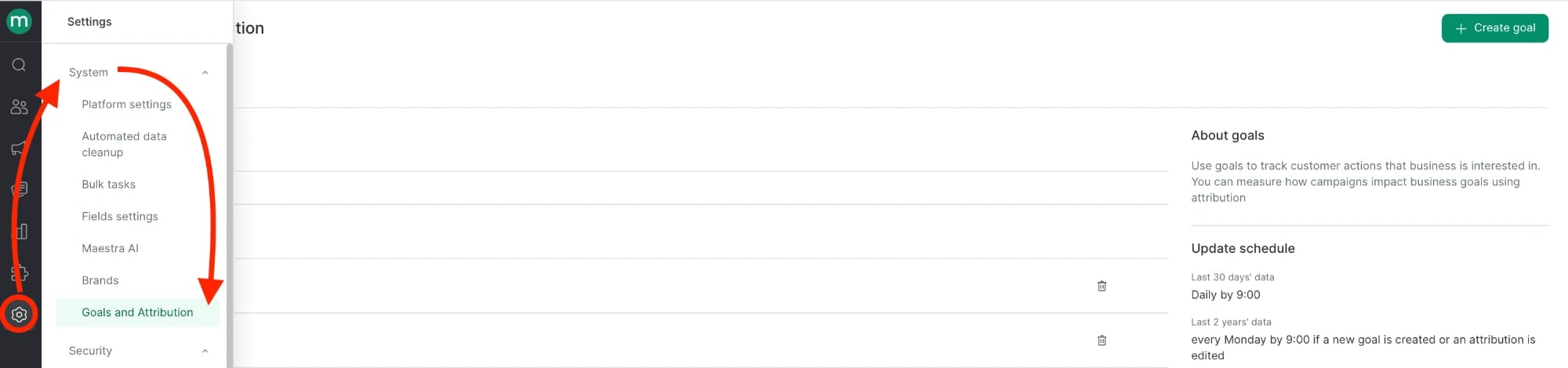
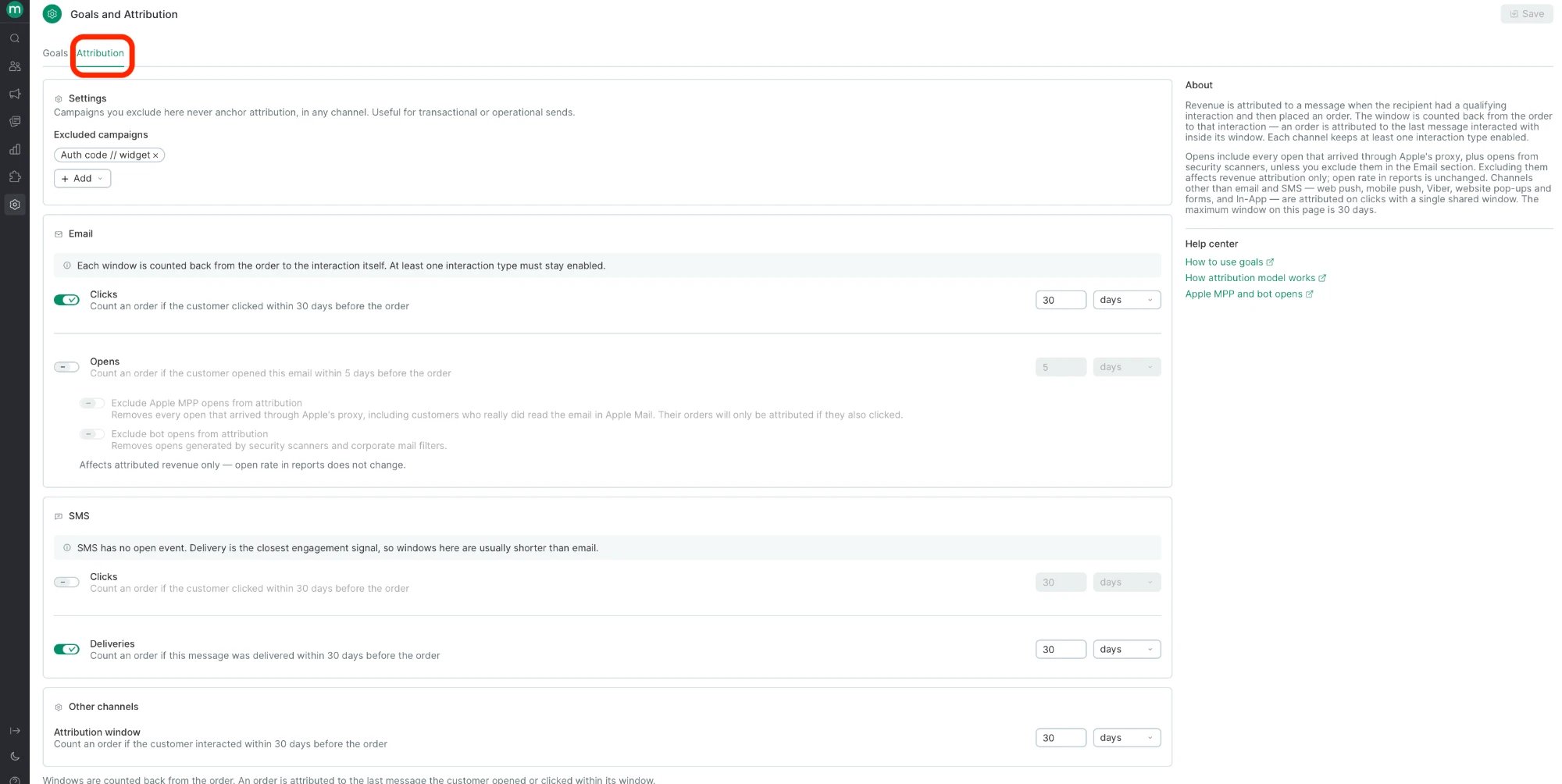
Excluded campaigns
In the Settings block, use Excluded campaigns to list transactional and other campaigns that don’t affect conversion and shouldn’t take revenue away from your marketing campaigns — for example, an SMS with an authorization code at checkout or a double opt-in email.Excluded campaigns never anchor attribution, in any channel.
- Clicks — counts an order if the customer clicked a link in the email within the window before the order.
- Opens — counts an order if the customer opened the email within the window before the order.
Turning on opens raises attributed revenue — usually noticeably, because opens catch customers who read the email and then go to your website directly without clicking. That’s expected, not a bug.
Excluding opens
Under the Opens row, two toggles decide which opens get thrown out of attribution:- Exclude Apple MPP opens from attribution — removes every open that came through Apple’s Mail Privacy Protection (MPP) proxy. Apple pre-loads email images for its Mail users, so some MPP opens are machine-generated. But real customers who read the email in Apple Mail come through the same proxy with the same signature, and there’s no way to tell them apart. So turning on this toggle drops real readers too: their orders only get attributed if they also clicked. Expect attributed revenue to go down when you enable it.
- Exclude bot opens from attribution — removes opens generated by security scanners and corporate mail filters.
SMS
- Clicks — counts an order if the customer clicked a link in the SMS within the window before the order. Requires link shortening and click tracking.
- Deliveries — counts an order if the SMS was delivered within the window before the order. Use this if you send SMS without links or don’t track clicks — customers can act on the text of an SMS without clicking anything.
Other channels
Web push, mobile push, Viber, website pop-ups and forms, and in-app are attributed on clicks, with one shared Attribution window.Once you click Save, changes apply from the next attribution calculation (see the update schedule below). Every change is recorded in the account event log.
Goal settings
Goal settings live on the next tab:
- Last 30 days of data — daily, by 09:00.
- Last 2 years of data — every Monday by 09:00, if you’ve created a new goal or edited the attribution settings.
Where to find attributed revenue
Attributed revenue shows up as one number — it isn’t split into open-attributed and click-attributed revenue.
Reports
Use these reports to see how channels and individual campaigns contribute to your goals.-
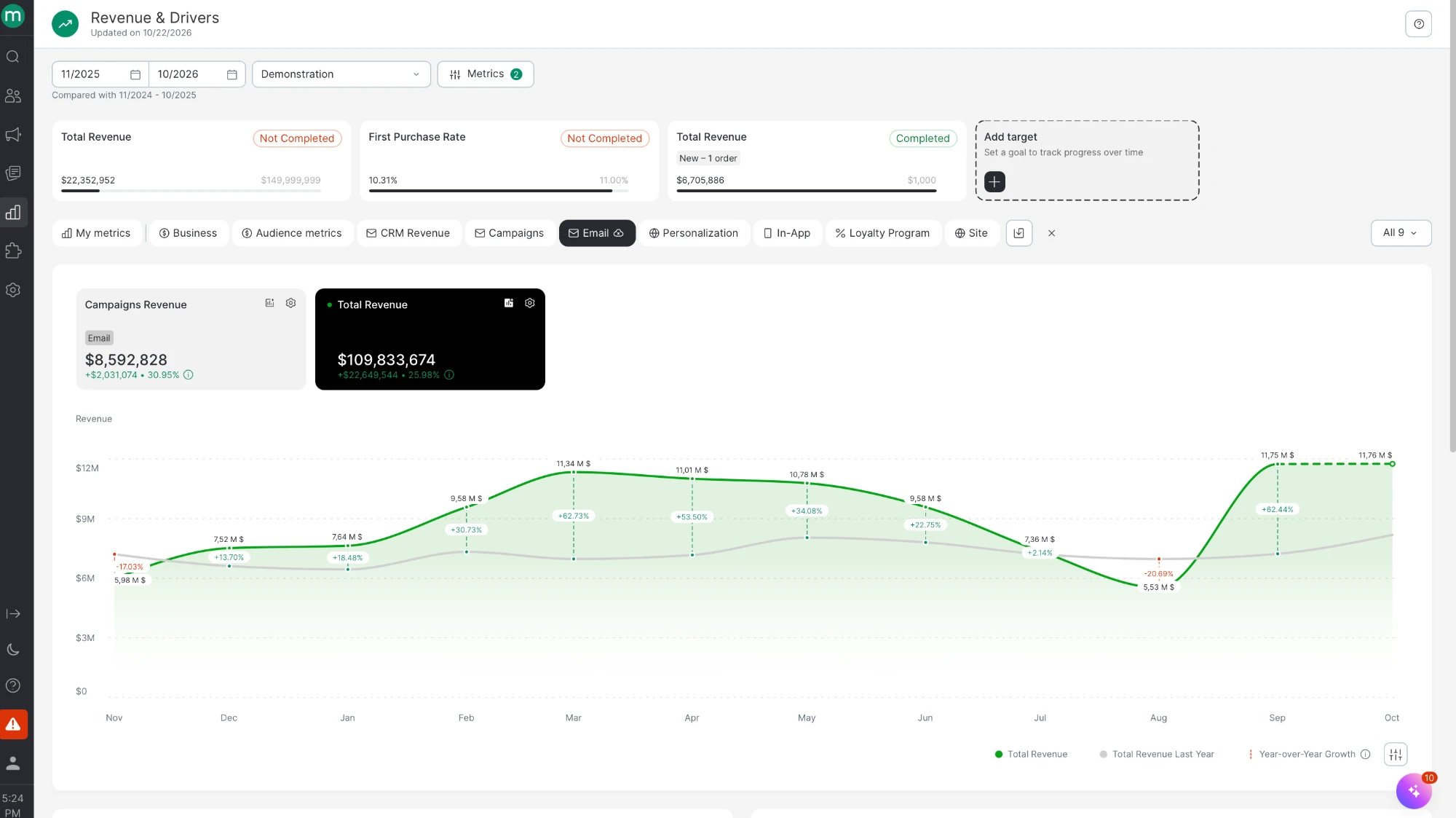
Revenue & Drivers report — track your goals and how each channel affects them. Add a target to see attributed revenue for every channel.
-
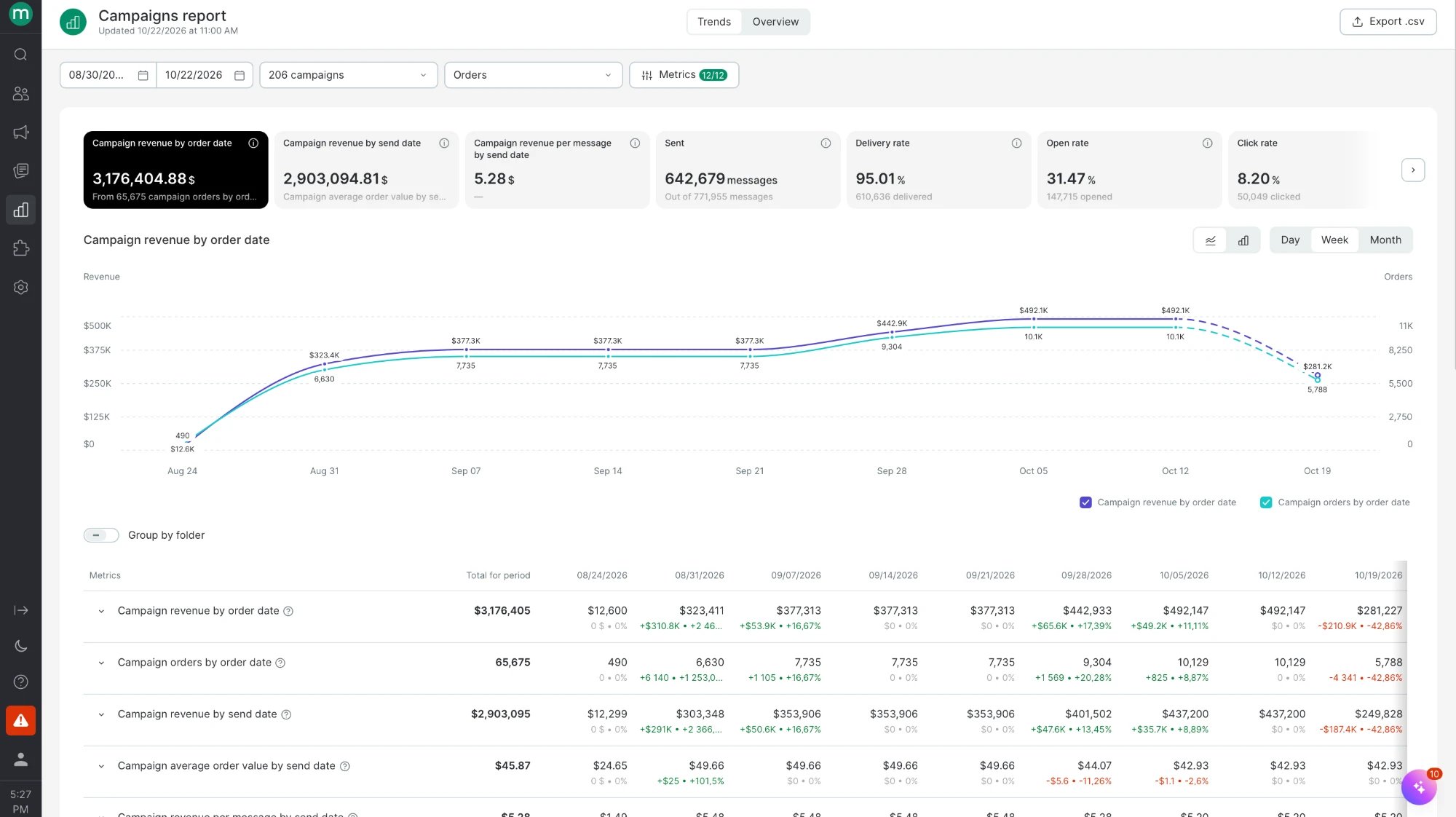
Campaigns report — see how each campaign affected the goal you’ve chosen.
-
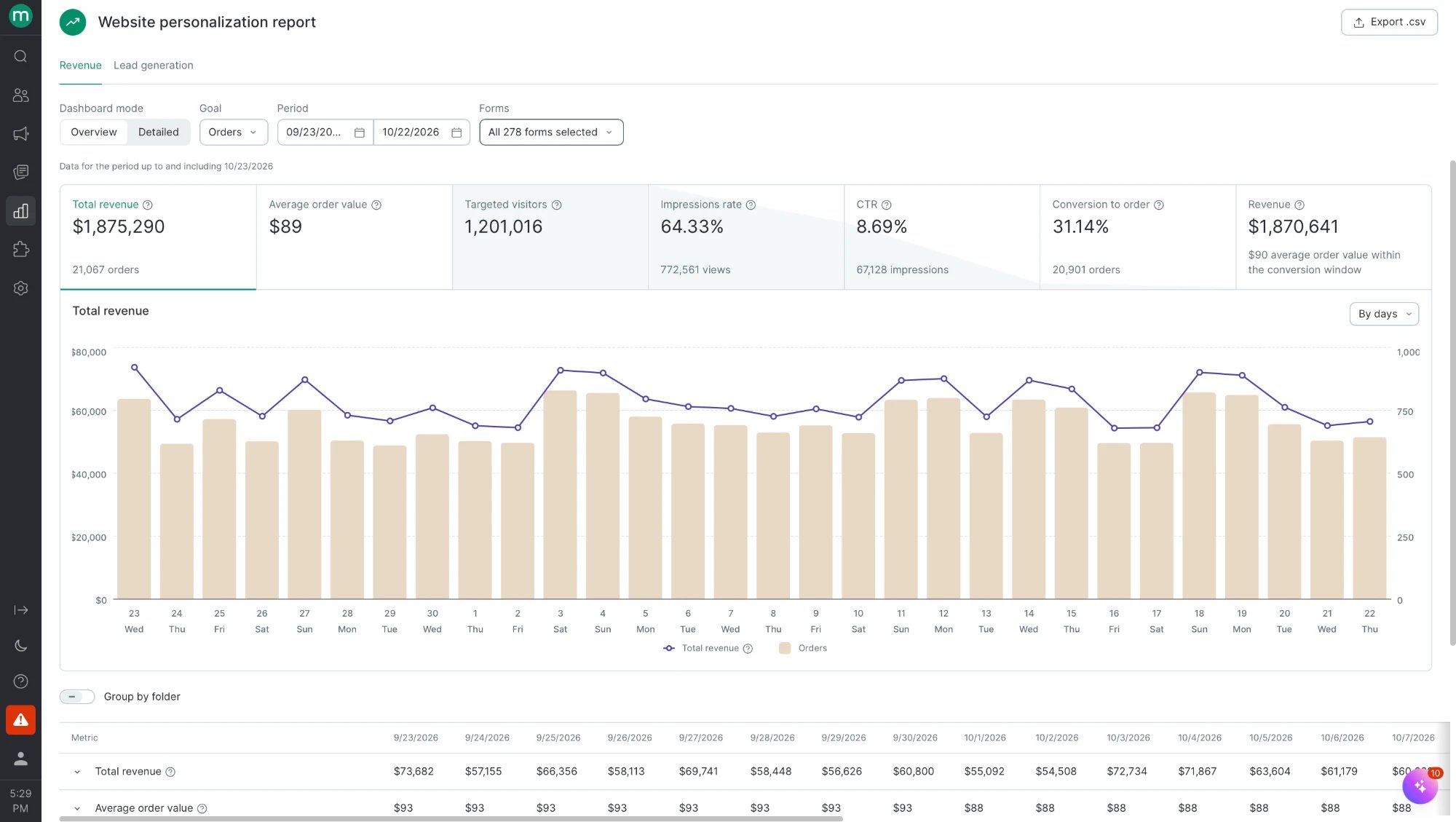
Website personalization report — see how each personalization campaign affected the goal you’ve chosen.
Filters
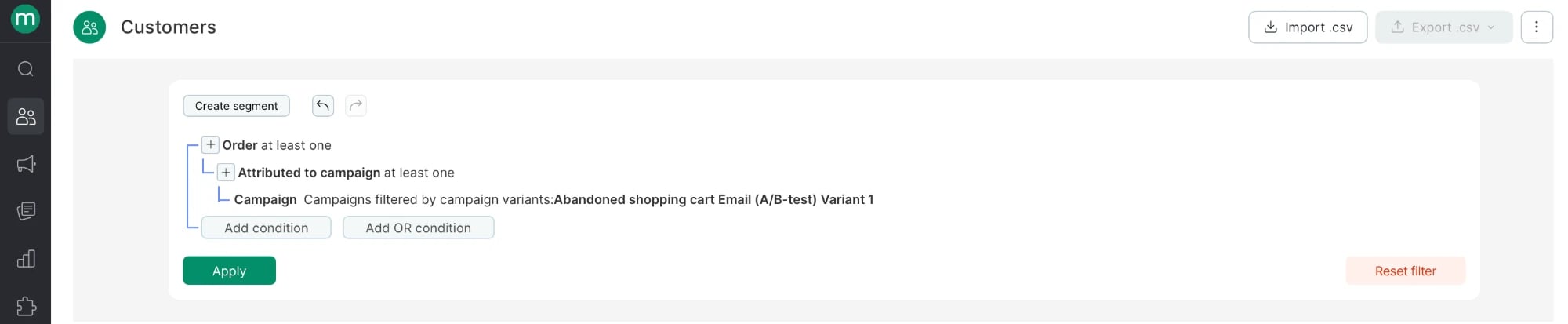
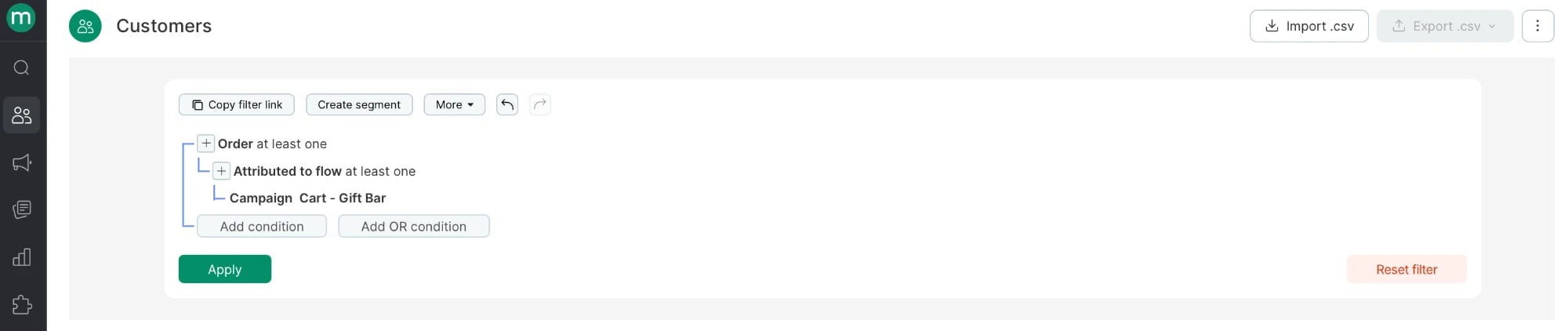
Use filters to select specific orders attributed to campaigns.-
Attributed to campaign filter:
-
Attributed to flow filter:
Export
Add the attribution flag to your export settings, and the file will include the campaigns that drove each conversion.
Why data from an external analytics system might not match Maestra Platform reports
- External analytics tools may not account for canceled and returned orders — their stats use the order value right after the order is placed. In Maestra Platform, you can exclude these orders by setting up goals. Excluded orders don’t appear in reports and don’t count toward final revenue.
- If you have a loyalty program connected, compare the amounts sent to Maestra Platform and to your external analytics tool. Maestra Platform receives the order value after promotions; other systems may be set up differently.
- If the gap is large, check your integration — the tracker may not be installed correctly, or there may be fake orders (an order far above your average order value). Make sure the Maestra tracker is installed on your website.
- If Maestra Platform shows fewer orders than your site database or GA, check your account’s integration: order data you send to GA should also reach Maestra Platform, and vice versa. Make sure no orders are placed without Maestra Platform knowing about them — that is, the order create and update operations are called for every order. For example, an order placed through a pop-up sends data to GA, but the operation that passes it to Maestra Platform isn’t set up.
- Attribution windows and interaction types differ between systems. Maestra Platform lets you choose which interactions count (opens, clicks, deliveries) and set a separate window for each interaction type, up to 30 days. Another system may count from the send date, use different windows, or filter Apple MPP and bot opens differently. Compare the settings before you compare the numbers.
FAQ
I turned on opens and attributed revenue jumped. Is that a bug?
I turned on opens and attributed revenue jumped. Is that a bug?
No. Opens catch the large group of customers who read an email and then go to your website directly without clicking a link. Until now, those orders weren’t attributed to email at all.How much revenue shifts depends on your audience. Accounts with lots of Apple Mail readers see a bigger uplift, because Apple MPP opens are counted by default.
Why did an old campaign suddenly get orders attributed to it?
Why did an old campaign suddenly get orders attributed to it?
The window is counted from the interaction, not from the send date. If a customer opened an old email (or Apple Mail pre-loaded it) shortly before ordering, and nothing more recent qualified, that old email gets the order. This affects the per-campaign breakdown more than the total.
Should I exclude Apple MPP opens?
Should I exclude Apple MPP opens?
Only if you’re fine with real Apple Mail readers no longer counting either — there’s no way to tell them apart from Apple’s pre-load. Most platforms that offer this setting also keep it off by default. If you need parity with another tool, match its setting.
Is my 5-day window the same as a 5-day window in another platform?
Is my 5-day window the same as a 5-day window in another platform?
Not necessarily. Some platforms count the window from the moment the message is received; Maestra Platform counts it from the interaction. A window counted from the interaction is slightly looser, so the same number of days gives slightly higher attributed revenue.
Does changing the settings recalculate the past?
Does changing the settings recalculate the past?
Settings apply from the next attribution calculation. Attributed revenue for earlier periods is recalculated during the regular 2-year update — but email opens are only collected for attribution from the moment you turn them on. Orders from before that date can’t be re-attributed to opens, so expect a step in your charts from the day you switch opens on.
Will SMS clicks still be collected if I attribute SMS on deliveries only?
Will SMS clicks still be collected if I attribute SMS on deliveries only?
Yes. Clicks are still tracked and shown in reports — they just don’t anchor attribution.
Does the open rate change when I exclude bot or MPP opens?
Does the open rate change when I exclude bot or MPP opens?
No. These toggles affect attributed revenue only. Open and click metrics in reports stay the same.